
A Classic Bulk Load Migration is the simplest way of migrating data to CockroachDB. In this approach, you stop application traffic to the source database and migrate data to the target cluster using MOLT Fetch during a significant downtime window. Application traffic is then cut over to the target after schema finalization and data verification.
All source data is migrated to the target at once.
This approach does not utilize continuous replication.
Rollback is manual, but in most cases it's simple, as the source database is preserved and write traffic begins on the target all at once. If you wish to roll back before the target has received any writes that are not present on the source database, nothing needs to be done. If you wish to roll back after the target has received writes that are not present on the source database, you must manually replicate these new rows on the source.
This approach is best for small databases (<100 GB), internal tools, dev/staging environments, and production environments that can handle business disruption. It's a simple approach that guarantees full data consistency and is easy to execute with limited resources, but it can only be performed if your system can handle significant downtime.
This page describes an example scenario. While the commands provided can be copy-and-pasted, they may need to be altered or reconsidered to suit the needs of your specific environment.
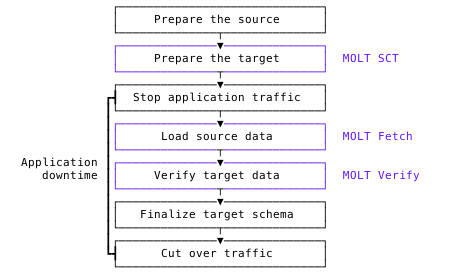
Example scenario
You have a small (50 GB) database that provides the data store for a web application. You want to migrate the entirety of this database to a new CockroachDB cluster. You schedule a maintenance window for Saturday from 2 AM to 6 AM, and announce it to your users several weeks in advance.
The application runs on a Kubernetes cluster.
Estimated system downtime: 4 hours.
Before the migration
- Install the MOLT (Migrate Off Legacy Technology) tools.
- Review the MOLT Fetch documentation.
- Develop a migration plan and prepare for the migration.
- Recommended: Perform a dry run of this full set of instructions in a development environment that closely resembles your production environment. This can help you get a realistic sense of the time and complexity it requires.
- Announce the maintenance window to your users.
- Understand the prerequisites and limitations of the MOLT tools:
Prerequisites
Oracle Instant Client
Install Oracle Instant Client on the machine that will run molt and replicator. If using the MOLT Replicator binary (instead of Docker), the Oracle Instant Client libraries must be accessible at /usr/lib.
On macOS ARM machines, download the Oracle Instant Client. After installation, you should have a new directory at
/Users/$USER/Downloads/instantclient_23_3containing.dylibfiles. Set theLD_LIBRARY_PATHenvironment variable to this directory:export LD_LIBRARY_PATH=/Users/$USER/Downloads/instantclient_23_3On Linux machines, install the Oracle Instant Client dependencies and set the
LD_LIBRARY_PATHto the client library path:sudo apt-get install -yqq --no-install-recommends libaio1t64 sudo ln -s /usr/lib/x86_64-linux-gnu/libaio.so.1t64 /usr/lib/x86_64-linux-gnu/libaio.so.1 unzip -d /tmp /tmp/instantclient-basiclite-linux-amd64.zip sudo mv /tmp/instantclient_21_13/* /usr/lib export LD_LIBRARY_PATH=/usr/libTip:You can also download Oracle Instant Client directly from the Oracle site for Linux ARM64 or Linux x86-64.
Limitations
MOLT Fetch limitations
- Only tables with primary key types of
INT,FLOAT, orUUIDcan be sharded with--export-concurrency. GEOMETRYandGEOGRAPHYtypes are not supported.
OID LOBtypes in PostgreSQL are not supported, although similar types likeBYTEAare supported.
- Migrations must be performed from a single Oracle schema. You must include
--schema-filterso that MOLT Fetch only loads data from the specified schema. Refer to Schema and table filtering.- Specifying
--table-filteris also strongly recommended to ensure that only necessary tables are migrated from the Oracle schema.
- Specifying
- Oracle advises against
LONG RAWcolumns and recommends converting them toBLOB.LONG RAWcan only store binary values up to 2GB, and only oneLONG RAWcolumn per table is supported.
MOLT Verify limitations
- MOLT Verify compares 20,000 rows at a time by default, and row values can change between batches, potentially resulting in temporary inconsistencies in data. To configure the row batch size, use the
--row_batch_sizeflag. - MOLT Verify checks for collation mismatches on primary key columns. This may cause validation to fail when a
STRINGis used as a primary key and the source and target databases are using different collations. - MOLT Verify might give an error in case of schema changes on either the source or target database.
- Geospatial types cannot yet be compared.
- MOLT Verify only supports comparing one MySQL database to a whole CockroachDB schema (which is assumed to be
public).
Step 1: Prepare the source database
In this step, you will:
Create migration user on source database
Create a dedicated migration user (for example, MIGRATION_USER) on the source database. This user is responsible for reading data from source tables during the migration. You will pass this username in the source connection string.
CREATE USER migration_user WITH PASSWORD 'password';
Grant the user privileges to connect, view schema objects, and select the tables you migrate.
GRANT CONNECT ON DATABASE migration_db TO migration_user;
GRANT USAGE ON SCHEMA migration_schema TO migration_user;
GRANT SELECT ON ALL TABLES IN SCHEMA migration_schema TO migration_user;
ALTER DEFAULT PRIVILEGES IN SCHEMA migration_schema GRANT SELECT ON TABLES TO migration_user;
CREATE USER 'migration_user'@'%' IDENTIFIED BY 'password';
Grant the user privileges to select the tables you migrate and access GTID information for snapshot consistency:
GRANT SELECT ON migration_db.* TO 'migration_user'@'%';
GRANT SELECT ON mysql.gtid_executed TO 'migration_user'@'%';
FLUSH PRIVILEGES;
CREATE USER MIGRATION_USER IDENTIFIED BY 'password';
When migrating from Oracle Multitenant (PDB/CDB), this should be a common user. Prefix the username with C## (e.g., C##MIGRATION_USER).
Grant the user privileges to connect, read metadata, and SELECT and FLASHBACK the tables you plan to migrate. The tables should all reside in a single schema (for example, migration_schema). For details, refer to Schema and table filtering.
Oracle Multitenant (PDB/CDB) user privileges
Connect to the Oracle CDB as a DBA and grant the following:
-- Basic access
GRANT CONNECT TO C##MIGRATION_USER;
GRANT CREATE SESSION TO C##MIGRATION_USER;

-- General metadata access
GRANT EXECUTE_CATALOG_ROLE TO C##MIGRATION_USER;
GRANT SELECT_CATALOG_ROLE TO C##MIGRATION_USER;

-- Access to necessary V$ views
GRANT SELECT ON V_$LOG TO C##MIGRATION_USER;
GRANT SELECT ON V_$LOGFILE TO C##MIGRATION_USER;
GRANT SELECT ON V_$LOGMNR_CONTENTS TO C##MIGRATION_USER;
GRANT SELECT ON V_$ARCHIVED_LOG TO C##MIGRATION_USER;
GRANT SELECT ON V_$DATABASE TO C##MIGRATION_USER;
GRANT SELECT ON V_$LOG_HISTORY TO C##MIGRATION_USER;

-- Direct grants to specific DBA views
GRANT SELECT ON ALL_USERS TO C##MIGRATION_USER;
GRANT SELECT ON DBA_USERS TO C##MIGRATION_USER;
GRANT SELECT ON DBA_OBJECTS TO C##MIGRATION_USER;
GRANT SELECT ON DBA_SYNONYMS TO C##MIGRATION_USER;
GRANT SELECT ON DBA_TABLES TO C##MIGRATION_USER;
Connect to the Oracle PDB (not the CDB) as a DBA and grant the following:
-- Allow C##MIGRATION_USER to connect to the PDB and see active transaction metadata
GRANT CONNECT TO C##MIGRATION_USER;
GRANT CREATE SESSION TO C##MIGRATION_USER;

-- General metadata access
GRANT SELECT_CATALOG_ROLE TO C##MIGRATION_USER;

-- Access to necessary V$ views
GRANT SELECT ON V_$SESSION TO C##MIGRATION_USER;
GRANT SELECT ON V_$TRANSACTION TO C##MIGRATION_USER;

-- Grant these two for every table to migrate in the migration_schema
GRANT SELECT, FLASHBACK ON migration_schema.tbl TO C##MIGRATION_USER;
Single-tenant Oracle user privileges
Connect to the Oracle database as a DBA and grant the following:
-- Basic access
GRANT CONNECT TO MIGRATION_USER;
GRANT CREATE SESSION TO MIGRATION_USER;

-- General metadata access
GRANT SELECT_CATALOG_ROLE TO MIGRATION_USER;
GRANT EXECUTE_CATALOG_ROLE TO MIGRATION_USER;

-- Access to necessary V$ views
GRANT SELECT ON V_$DATABASE TO MIGRATION_USER;
GRANT SELECT ON V_$SESSION TO MIGRATION_USER;
GRANT SELECT ON V_$TRANSACTION TO MIGRATION_USER;

-- Direct grants to specific DBA views
GRANT SELECT ON ALL_USERS TO MIGRATION_USER;
GRANT SELECT ON DBA_USERS TO MIGRATION_USER;
GRANT SELECT ON DBA_OBJECTS TO MIGRATION_USER;
GRANT SELECT ON DBA_SYNONYMS TO MIGRATION_USER;
GRANT SELECT ON DBA_TABLES TO MIGRATION_USER;

-- Grant these two for every table to migrate in the migration_schema
GRANT SELECT, FLASHBACK ON migration_schema.tbl TO MIGRATION_USER;
Step 2: Prepare the target database
In this step, you will:
- Provision and run a new CockroachDB cluster.
- Define the tables on the target cluster to match those on the source.
- Create a SQL user on the target cluster with the necessary write permissions.
Provision a CockroachDB cluster
Use one of the following options to create and run a new CockroachDB cluster. This is your migration target.
Option 1: Create a secure cluster locally
If you have the CockroachDB binary installed locally, you can manually deploy a multi-node, self-hosted CockroachDB cluster on your local machine.
Learn how to deploy a CockroachDB cluster locally.
Option 2: Create a CockroachDB Self-Hosted cluster on AWS
You can manually deploy a multi-node, self-hosted CockroachDB cluster on Amazon's AWS EC2 platform, using AWS's managed load-balancing service to distribute client traffic.
Learn how to deploy a CockroachDB cluster on AWS.
Option 3: Create a CockroachDB Cloud cluster
CockroachDB Cloud is a fully-managed service run by Cockroach Labs, which simplifies the deployment and management of CockroachDB.
Sign up for a CockroachDB Cloud account and create a cluster using trial credits.
Define the target tables
Convert the source table definitions into CockroachDB-compatible equivalents. CockroachDB supports the PostgreSQL wire protocol and is largely compatible with PostgreSQL syntax.
The source and target table definitions must match. Review Type mapping to understand which source types can be mapped to CockroachDB types.
For example, a PostgreSQL source table defined as
CREATE TABLE migration_schema.tbl (pk INT PRIMARY KEY);must have a corresponding schema and table in CockroachDB:CREATE SCHEMA migration_schema; CREATE TABLE migration_schema.tbl (pk INT PRIMARY KEY);MySQL tables belong directly to the database specified in the connection string. A MySQL source table defined as
CREATE TABLE tbl (id INT PRIMARY KEY);should map to CockroachDB's defaultpublicschema:CREATE TABLE tbl (id INT PRIMARY KEY);For example, an Oracle source table defined as
CREATE TABLE migration_schema.tbl (pk INT PRIMARY KEY);must have a corresponding schema and table in CockroachDB:CREATE SCHEMA migration_schema; CREATE TABLE migration_schema.tbl (pk INT PRIMARY KEY);- MOLT Fetch can automatically define matching CockroachDB tables using the
drop-on-target-and-recreateoption. - If you define the target tables manually, review how MOLT Fetch handles type mismatches. You can use the MOLT Schema Conversion Tool to create matching table definitions.
By default, table and column names are case-insensitive in MOLT Fetch. If using the
--case-sensitiveflag, schema, table, and column names must match Oracle's default uppercase identifiers. Use quoted names on the target to preserve case. For example, the following CockroachDB SQL statement will error:CREATE TABLE co.stores (... store_id ...);It should be written as:
CREATE TABLE "CO"."STORES" (... "STORE_ID" ...);When using
--case-sensitive, quote all identifiers and match the case exactly (for example, use"CO"."STORES"and"STORE_ID").
- MOLT Fetch can automatically define matching CockroachDB tables using the
Every table must have an explicit primary key.
Warning:Avoid using sequential keys. To learn more about the performance issues that can result from their use, refer to the guidance on indexing with sequential keys. If a sequential key is necessary in your CockroachDB table, you must create it manually, after using MOLT Fetch to load and replicate the data.
Review Transformations to understand how computed columns and partitioned tables can be mapped to the target, and how target tables can be renamed.
By default on CockroachDB,
INTis an alias forINT8, which creates 64-bit signed integers. PostgreSQL and MySQL default to 32-bit integers. Depending on your source database or application requirements, you may need to change the integer size to4. For more information, refer to Considerations for 64-bit signed integers.
Schema Conversion Tool
The MOLT Schema Conversion Tool (SCT) converts source table definitions to CockroachDB-compatible syntax. It requires a free CockroachDB Cloud account.
Upload a source
.sqlfile to convert the syntax and identify unimplemented features and syntax incompatibilities in the table definitions.Import the converted table definitions to a CockroachDB cluster:
- When migrating to CockroachDB Cloud, the Schema Conversion Tool automatically applies the converted table definitions to a new Cloud database.
- When migrating to a self-hosted CockroachDB cluster, export a converted DDL file and pipe the data definition language (DDL) directly into
cockroach sql.
Syntax that cannot automatically be converted will be displayed in the Summary Report. These may include the following:
String case sensitivity
Strings are case-insensitive in MySQL and case-sensitive in CockroachDB. You may need to edit your MySQL data to get the results you expect from CockroachDB. For example, you may have been doing string comparisons in MySQL that will need to be changed to work with CockroachDB.
For more information about the case sensitivity of strings in MySQL, refer to Case Sensitivity in String Searches from the MySQL documentation. For more information about CockroachDB strings, refer to STRING.
Identifier case sensitivity
Identifiers are case-sensitive in MySQL and case-insensitive in CockroachDB. When using the Schema Conversion Tool, you can either keep case sensitivity by enclosing identifiers in double quotes, or make identifiers case-insensitive by converting them to lowercase.
AUTO_INCREMENT attribute
The MySQL AUTO_INCREMENT attribute, which creates sequential column values, is not supported in CockroachDB. When using the Schema Conversion Tool, columns with AUTO_INCREMENT can be converted to use sequences, UUID values with gen_random_uuid(), or unique INT8 values using unique_rowid(). Cockroach Labs does not recommend using a sequence to define a primary key column. For more information, refer to Unique ID best practices.
Changing a column type during table definition conversion will cause MOLT Verify to identify a type mismatch during data validation. This is expected behavior.
ENUM type
MySQL ENUM types are defined in table columns. On CockroachDB, ENUM is a standalone type. When using the Schema Conversion Tool, you can either deduplicate the ENUM definitions or create a separate type for each column.
TINYINT type
TINYINT data types are not supported in CockroachDB. The Schema Conversion Tool automatically converts TINYINT columns to INT2 (SMALLINT).
Geospatial types
MySQL geometry types are not converted to CockroachDB geospatial types by the Schema Conversion Tool. They should be manually converted to the corresponding types in CockroachDB.
FIELD function
The MYSQL FIELD function is not supported in CockroachDB. Instead, you can use the array_position function, which returns the index of the first occurrence of element in the array.
Example usage:
SELECT array_position(ARRAY[4,1,3,2],1);
  array_position
------------------
               2
(1 row)
While MySQL returns 0 when the element is not found, CockroachDB returns NULL. So if you are using the ORDER BY clause in a statement with the array_position function, the caveat is that sort is applied even when the element is not found. As a workaround, you can use the COALESCE operator.
SELECT * FROM table_a ORDER BY COALESCE(array_position(ARRAY[4,1,3,2],5),999);
Drop constraints and indexes
To optimize data load performance, drop all non-PRIMARY KEY constraints and indexes on the target CockroachDB database before migrating:
FOREIGN KEYUNIQUE- Secondary indexes
CHECKDEFAULTNOT NULL(you do not need to drop this constraint when usingdrop-on-target-and-recreatefor table handling)
Do not drop PRIMARY KEY constraints.
You can recreate the constraints and indexes after loading the data.
Create the SQL user
Create a SQL user in the CockroachDB cluster that has the necessary privileges.
To create a user crdb_user in the default database (you will pass this username in the target connection string):
CREATE USER crdb_user WITH PASSWORD 'password';
Grant database-level privileges for schema creation within the target database:
GRANT ALL ON DATABASE defaultdb TO crdb_user;
Grant permission to modify cluster settings:
GRANT SYSTEM MODIFYCLUSTERSETTING TO crdb_user;
Grant usage on schemas being migrated:
GRANT USAGE ON SCHEMA migration_schema TO crdb_user;
GRANT USAGE ON SCHEMA public TO crdb_user;
Grant user privileges to create tables in the migration_schema schema and internal MOLT tables like _molt_fetch_exceptions in the public CockroachDB schema:
Ensure that you are connected to the target database.
GRANT CREATE ON SCHEMA migration_schema TO crdb_user;
GRANT CREATE ON SCHEMA public TO crdb_user;
If you manually defined the target tables (which means that drop-on-target-and-recreate will not be used), grant the following privileges on the schema:
GRANT SELECT, INSERT, UPDATE, DELETE ON ALL TABLES IN SCHEMA migration_schema TO crdb_user;
ALTER DEFAULT PRIVILEGES IN SCHEMA migration_schema
GRANT SELECT, INSERT, UPDATE, DELETE ON TABLES TO crdb_user;
Grant the same privileges for internal MOLT tables in the public CockroachDB schema:
GRANT SELECT, INSERT, UPDATE, DELETE ON ALL TABLES IN SCHEMA public TO crdb_user;
ALTER DEFAULT PRIVILEGES IN SCHEMA public
GRANT SELECT, INSERT, UPDATE, DELETE ON TABLES TO crdb_user;
If you will be running Fetch with drop-on-target-and-recreate, and the target schema has pre-existing tables that were created by a different user, you may need to change table ownership to allow the migration user to drop those tables. Make the following alteration for each table:
ALTER TABLE migration_schema.table1 OWNER TO crdb_user;
Depending on the MOLT Fetch data load mode you will use, grant the necessary privileges to run either IMPORT INTO or COPY FROM on the target tables:
IMPORT INTO privileges
Grant SELECT, INSERT, and DROP (required because the table is taken offline during the IMPORT INTO) privileges on all tables being migrated:
GRANT SELECT, INSERT, DROP ON ALL TABLES IN SCHEMA migration_schema TO crdb_user;
GRANT SELECT, INSERT, DROP ON ALL TABLES IN SCHEMA public TO crdb_user;
If you plan to use cloud storage with implicit authentication for data load, grant the EXTERNALIOIMPLICITACCESS system-level privilege:
GRANT SYSTEM EXTERNALIOIMPLICITACCESS TO crdb_user;
COPY FROM privileges
Grant admin privileges to the user:
GRANT admin TO crdb_user;
Step 3: Stop application traffic
With both the source and target databases prepared for the data load, it's time to stop application traffic to the source. At the start of the maintenance window, scale down the Kubernetes cluster to zero pods.
kubectl scale deployment app --replicas=0
Application downtime begins now.
It is strongly recommended that you perform a dry run of this migration in a test environment. This will allow you to practice using the MOLT tools in real time, and it will give you an accurate sense of how long application downtime might last.
Step 4: Load data into CockroachDB
In this step, you will:
- Configure MOLT Fetch with the flags needed for your migration.
- Run MOLT Fetch.
- Understand how to continue a load after an interruption.
Configure MOLT Fetch
The MOLT Fetch documentation includes detailed information about how to configure MOLT Fetch, and how to monitor MOLT Fetch metrics.
When you run molt fetch, you can configure the following options for data load:
- Specify source and target databases: Specify URL‑encoded source and target connections.
- Select data to migrate: Specify schema and table names to migrate.
- Define intermediate file storage: Export data to cloud storage or a local file server.
- Define fetch mode: Specifies whether data will only be loaded into/from intermediate storage.
- Shard tables: Divide larger tables into multiple shards during data export.
- Data load mode: Choose between
IMPORT INTOandCOPY FROM. - Table handling mode: Determine how existing target tables are initialized before load.
- Define data transformations: Define any row-level transformations to apply to the data before it reaches the target.
- Monitor fetch metrics: Configure metrics collection during initial data load.
Read through the documentation to understand how to configure your molt fetch command and its flags. Follow best practices, especially those related to security.
At minimum, the molt fetch command should include the source, target, data path, and --ignore-replication-check flags:
molt fetch \
--source $SOURCE \
--target $TARGET \
--bucket-path 's3://bucket/path' \
--ignore-replication-check
However, depending on the needs of your migration, you may have many more flags set, and you may need to prepare some accompanying .json files.
Run MOLT Fetch
Perform the bulk load of the source data.
Run the MOLT Fetch command to move the source data into CockroachDB. This example command passes the source and target connection strings as environment variables, writes intermediate files to S3 storage, and uses the
truncate-if-existstable handling mode to truncate the target tables before loading data. It limits the migration to a single schema and filters for three specific tables. The data load mode defaults toIMPORT INTO. Include the--ignore-replication-checkflag to skip replication checkpoint queries, which eliminates the need to configure the source database for logical replication.molt fetch \ --source $SOURCE \ --target $TARGET \ --schema-filter 'migration_schema' \ --table-filter 'employees|payments|orders' \ --bucket-path 's3://migration/data/cockroach' \ --table-handling truncate-if-exists \ --ignore-replication-checkmolt fetch \ --source $SOURCE \ --target $TARGET \ --table-filter 'employees|payments|orders' \ --bucket-path 's3://migration/data/cockroach' \ --table-handling truncate-if-exists \ --ignore-replication-checkThe command assumes an Oracle Multitenant (CDB/PDB) source.
--source-cdbspecifies the container database (CDB) connection string.molt fetch \ --source $SOURCE \ --source-cdb $SOURCE_CDB \ --target $TARGET \ --schema-filter 'migration_schema' \ --table-filter 'employees|payments|orders' \ --bucket-path 's3://migration/data/cockroach' \ --table-handling truncate-if-exists \ --ignore-replication-checkCheck the output to observe
fetchprogress.A
starting fetchmessage indicates that the task has started:{"level":"info","type":"summary","num_tables":3,"cdc_cursor":"0/43A1960","time":"2025-02-10T14:28:11-05:00","message":"starting fetch"}{"level":"info","type":"summary","num_tables":3,"cdc_cursor":"4c658ae6-e8ad-11ef-8449-0242ac140006:1-29","time":"2025-02-10T14:28:11-05:00","message":"starting fetch"}{"level":"info","type":"summary","num_tables":3,"cdc_cursor":"backfillFromSCN=26685444,scn=26685786","time":"2025-02-10T14:28:11-05:00","message":"starting fetch"}data extractionmessages are written for each table that is exported to the location in--bucket-path:{"level":"info","table":"migration_schema.employees","time":"2025-02-10T14:28:11-05:00","message":"data extraction phase starting"}{"level":"info","table":"migration_schema.employees","type":"summary","num_rows":200000,"export_duration_ms":1000,"export_duration":"000h 00m 01s","time":"2025-02-10T14:28:12-05:00","message":"data extraction from source complete"}{"level":"info","table":"public.employees","time":"2025-02-10T14:28:11-05:00","message":"data extraction phase starting"}{"level":"info","table":"public.employees","type":"summary","num_rows":200000,"export_duration_ms":1000,"export_duration":"000h 00m 01s","time":"2025-02-10T14:28:12-05:00","message":"data extraction from source complete"}data importmessages are written for each table that is loaded into CockroachDB:{"level":"info","table":"migration_schema.employees","time":"2025-02-10T14:28:12-05:00","message":"starting data import on target"}{"level":"info","table":"migration_schema.employees","type":"summary","net_duration_ms":1899.748333,"net_duration":"000h 00m 01s","import_duration_ms":1160.523875,"import_duration":"000h 00m 01s","export_duration_ms":1000,"export_duration":"000h 00m 01s","num_rows":200000,"cdc_cursor":"0/43A1960","time":"2025-02-10T14:28:13-05:00","message":"data import on target for table complete"}{"level":"info","table":"public.employees","time":"2025-02-10T14:28:12-05:00","message":"starting data import on target"}{"level":"info","table":"public.employees","type":"summary","net_duration_ms":1899.748333,"net_duration":"000h 00m 01s","import_duration_ms":1160.523875,"import_duration":"000h 00m 01s","export_duration_ms":1000,"export_duration":"000h 00m 01s","num_rows":200000,"cdc_cursor":"4c658ae6-e8ad-11ef-8449-0242ac140006:1-29","time":"2025-02-10T14:28:13-05:00","message":"data import on target for table complete"}{"level":"info","table":"migration_schema.employees","time":"2025-02-10T14:28:12-05:00","message":"starting data import on target"}{"level":"info","table":"migration_schema.employees","type":"summary","net_duration_ms":1899.748333,"net_duration":"000h 00m 01s","import_duration_ms":1160.523875,"import_duration":"000h 00m 01s","export_duration_ms":1000,"export_duration":"000h 00m 01s","num_rows":200000,"cdc_cursor":"backfillFromSCN=26685444,scn=26685786","time":"2025-02-10T14:28:13-05:00","message":"data import on target for table complete"}A
fetch completemessage is written when the fetch task succeeds:{"level":"info","type":"summary","fetch_id":"f5cb422f-4bb4-4bbd-b2ae-08c4d00d1e7c","num_tables":3,"tables":["migration_schema.employees","migration_schema.payments","migration_schema.payments"],"cdc_cursor":"0/3F41E40","net_duration_ms":6752.847625,"net_duration":"000h 00m 06s","time":"2024-03-18T12:30:37-04:00","message":"fetch complete"}{"level":"info","type":"summary","fetch_id":"f5cb422f-4bb4-4bbd-b2ae-08c4d00d1e7c","num_tables":3,"tables":["public.employees","public.payments","public.payments"],"cdc_cursor":"4c658ae6-e8ad-11ef-8449-0242ac140006:1-29","net_duration_ms":6752.847625,"net_duration":"000h 00m 06s","time":"2024-03-18T12:30:37-04:00","message":"fetch complete"}{"level":"info","type":"summary","fetch_id":"f5cb422f-4bb4-4bbd-b2ae-08c4d00d1e7c","num_tables":3,"tables":["migration_schema.employees","migration_schema.payments","migration_schema.payments"],"cdc_cursor":"backfillFromSCN=26685444,scn=26685786","net_duration_ms":6752.847625,"net_duration":"000h 00m 06s","time":"2024-03-18T12:30:37-04:00","message":"fetch complete"}
Continue MOLT Fetch after an interruption
If MOLT Fetch fails while loading data into CockroachDB from intermediate files, it exits with an error message, fetch ID, and continuation token for each table that failed to load on the target database.
{"level":"info","table":"public.employees","file_name":"shard_01_part_00000001.csv.gz","message":"creating or updating token for duplicate key value violates unique constraint \"employees_pkey\"; Key (id)=(1) already exists."}
{"level":"info","table":"public.employees","continuation_token":"a1b2c3d4-e5f6-7890-abcd-ef1234567890","message":"created continuation token"}
{"level":"info","fetch_id":"f5cb422f-4bb4-4bbd-b2ae-08c4d00d1e7c","message":"continue from this fetch ID"}
{"level":"error","message":"Error: error from fetching table for public.employees: error importing data: duplicate key value violates unique
constraint \"employees_pkey\" (SQLSTATE 23505)"}
You can use this information to continue the task from the continuation point where it was interrupted.
Continuation is only possible under the following conditions:
- All data has been exported from the source database into intermediate files on cloud or local storage.
- The initial load of source data into the target CockroachDB database is incomplete.
- The load uses
IMPORT INTOrather thanCOPY FROM.
Only one fetch ID and set of continuation tokens, each token corresponding to a table, are active at any time. See List active continuation tokens.
The following command reattempts the data load starting from a specific continuation file, but you can also use individual continuation tokens to reattempt the data load for individual tables.
molt fetch \
--source $SOURCE \
--target $TARGET \
--schema-filter 'migration_schema' \
--table-filter 'employees|payments|orders' \
--bucket-path 's3://migration/data/cockroach' \
--table-handling truncate-if-exists \
--ignore-replication-check \
--fetch-id f5cb422f-4bb4-4bbd-b2ae-08c4d00d1e7c \
--continuation-file-name shard_01_part_00000001.csv.gz
molt fetch \
--source $SOURCE \
--target $TARGET \
--table-filter 'employees|payments|orders' \
--bucket-path 's3://migration/data/cockroach' \
--table-handling truncate-if-exists \
--ignore-replication-check \
--fetch-id f5cb422f-4bb4-4bbd-b2ae-08c4d00d1e7c \
--continuation-file-name shard_01_part_00000001.csv.gz
The command assumes an Oracle Multitenant (CDB/PDB) source. --source-cdb specifies the container database (CDB) connection string.
molt fetch \
--source $SOURCE \
--source-cdb $SOURCE_CDB \
--target $TARGET \
--schema-filter 'migration_schema' \
--table-filter 'employees|payments|orders' \
--bucket-path 's3://migration/data/cockroach' \
--table-handling truncate-if-exists \
--ignore-replication-check \
--fetch-id f5cb422f-4bb4-4bbd-b2ae-08c4d00d1e7c \
--continuation-file-name shard_01_part_00000001.csv.gz
Step 5: Verify the data
In this step, you will use MOLT Verify to confirm that the source and target data is consistent. This ensures that the data load was successful.
Run MOLT Verify
Run the MOLT Verify command, specifying the source and target connection strings and the tables to validate.
molt verify \ --source $SOURCE \ --target $TARGET \ --table-filter 'employees|payments|orders'molt verify \ --source $SOURCE \ --target $TARGET \ --table-filter 'employees|payments|orders'molt verify \ --source $SOURCE \ --target $TARGET \ --table-filter 'employees|payments|orders'Note:With Oracle Multitenant deployments, while
--source-cdbis required forfetch, it is not necessary forverify.Check the output to observe
verifyprogress.A
verification in progressindicates that the task has started:{"level":"info","time":"2025-02-10T15:35:04-05:00","message":"verification in progress"}starting verifymessages are written for each specified table:{"level":"info","time":"2025-02-10T15:35:04-05:00","message":"starting verify on public.employees, shard 1/1"}A
finished row verificationmessage is written after each table is compared. Ifnum_successequalsnum_truth_rowsand the error counters (num_missing,num_mismatch,num_extraneous, andnum_column_mismatch) are all0, the table verified successfully. Any non-zero values in the error counters indicate data discrepancies that need investigation. For details on each field, refer to the MOLT Verify page.{"level":"info","type":"summary","table_schema":"public","table_name":"employees","num_truth_rows":200004,"num_success":200004,"num_conditional_success":0,"num_missing":0,"num_mismatch":0,"num_extraneous":0,"num_live_retry":0,"num_column_mismatch":0,"time":"2025-02-10T15:35:05-05:00","message":"finished row verification on public.employees (shard 1/1)"}A
verification completemessage is written when the verify task succeeds:{"level":"info","net_duration_ms":699.804875,"net_duration":"000h 00m 00s","time":"2025-02-10T15:35:05-05:00","message":"verification complete"}
Step 6: Finalize the target schema
Add constraints and indexes
Add any constraints or indexes that you previously removed from the CockroachDB schema to facilitate data load.
If you used the --table-handling drop-on-target-and-recreate option for data load, only PRIMARY KEY and NOT NULL constraints are preserved. You must manually recreate all other constraints and indexes.
For the appropriate SQL syntax, refer to ALTER TABLE ... ADD CONSTRAINT and CREATE INDEX. Review the best practices for creating secondary indexes on CockroachDB.
Step 7: Cut over application traffic
With the target cluster verified and finalized, it's time to resume application traffic.
Modify application code
In the application back end, make sure that the application now directs traffic to the CockroachDB cluster. For example:
env:
  - name: DATABASE_URL
    value: postgres://root@localhost:26257/defaultdb?sslmode=verify-full
Resume application traffic
Scale up the Kubernetes deployment to the original number of replicas:
kubectl scale deployment app --replicas=3
This ends downtime.
Troubleshooting
Fetch issues
Fetch exits early due to mismatches
When run in none or truncate-if-exists mode, molt fetch exits early in the following cases, and will output a log with a corresponding mismatch_tag and failable_mismatch set to true:
- A source table is missing a primary key.
A source primary key and target primary key have mismatching types.
Tip:These restrictions (missing or mismatching primary keys) can be bypassed with--skip-pk-check.A
STRINGprimary key has a different collation on the source and target.A source and target column have mismatching types that are not allowable mappings.
A target table is missing a column that is in the corresponding source table.
A source column is nullable, but the corresponding target column is not nullable (i.e., the constraint is more strict on the target).
molt fetch can continue in the following cases, and will output a log with a corresponding mismatch_tag and failable_mismatch set to false:
- A target table has a column that is not in the corresponding source table.
- A source column has a
NOT NULLconstraint, and the corresponding target column is nullable (i.e., the constraint is less strict on the target). - A
DEFAULT,CHECK,FOREIGN KEY, orUNIQUEconstraint is specified on a target column and not on the source column.
Failed to export snapshot: no rows in result set
failed to export snapshot: please ensure that you have GTID-based replication enabled: sql: no rows in result set
This typically occurs on a new MySQL cluster that has not had any writes committed. The GTID set will not appear in SHOW MASTER STATUS until at least one transaction has been committed on the database.
Resolution: Execute a minimal transaction to initialize the GTID set:
START TRANSACTION;
SELECT 1;
COMMIT;
Verify that the GTID set now appears:
SHOW MASTER STATUS;
This should return a valid GTID value instead of an empty result.
ORA-01950: no privileges on tablespace
If you receive ORA-01950: no privileges on tablespace 'USERS', it means the Oracle table owner (migration_schema in the preceding examples) does not have sufficient quota on the tablespace used to store its data. By default, this tablespace is USERS, but it can vary. To resolve this issue, grant a quota to the table owner. For example:
-- change UNLIMITED to a suitable limit for the table owner
ALTER USER migration_schema QUOTA UNLIMITED ON USERS;
No tables to drop and recreate on target
When expecting a bulk load but seeing no tables to drop and recreate on the target, ensure the migration user has SELECT and FLASHBACK privileges on each table to be migrated. For example:
GRANT SELECT, FLASHBACK ON migration_schema.employees TO C##MIGRATION_USER;
GRANT SELECT, FLASHBACK ON migration_schema.payments TO C##MIGRATION_USER;
GRANT SELECT, FLASHBACK ON migration_schema.orders TO C##MIGRATION_USER;
Table or view does not exist
If the Oracle migration user lacks privileges on certain tables, you may receive errors stating that the table or view does not exist. Either use --table-filter to limit the tables to be migrated, or grant the migration user SELECT privileges on all objects in the schema. Refer to Create migration user on source database.
Oracle sessions remain open after forcefully stopping molt or replicator
If you shut down molt or replicator unexpectedly (e.g., with kill -9 or a system crash), Oracle sessions opened by these tools may remain active.
- Check your operating system for any running
moltorreplicatorprocesses and terminate them manually. After confirming that both processes have stopped, ask a DBA to check for active Oracle sessions using:
SELECT sid, serial#, username, status, osuser, machine, program
FROM v$session
WHERE username = 'C##MIGRATION_USER';
Wait until any remaining sessions display an
INACTIVEstatus, then terminate them using:ALTER SYSTEM KILL SESSION 'sid,serial#' IMMEDIATE;Replace
sidandserial#in the preceding statement with the values returned by theSELECTquery.
